Thursday, 4 July 2019

GoPro (Re)Training, Part 1

Filming with the Default Factory Settings
Well I'm back - after a huge hiatus (life stuff) - so in a way I'm starting from square one again as I've forgotten so much. Today I'm dusting off my GoPro Hero 4 Black - yes, I know, that is so 'old' now!
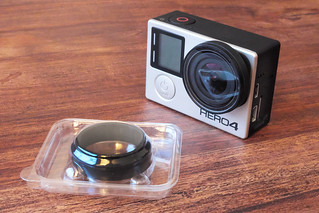
GoPro 4 lens cover by GoPro
In 2016 this was cutting edge...
Things move so fast in the work of action cameras, GoPro has advanced to the HERO 7 and you can now even get a 'cheap' GoPro clone as good as my Hero 4 (actually better, really, as you can get in-built stabilisation) for just over £100...And if stabilisation doesn't worry you then you can get a comparable action cam for just £60.

EKEN H9R Ultra HD 4K Action Camera
In 2019 this EKEN H9R Ultra does everything my GoPro 4 Hero Black
does, but for the price of just £54! Technology marches on.
But, let's begin with my Hero 4 as it's still a nice wee camera. Today I'm doing some sunny day filming with the camera's default factory settings so I can create some 'control' footage. I'll be using this to compare with subsequent footage using any modified settings.

A Walk in the Park?
We took the dog out to one of the little wildlife reserve parks on the outskirts of our town, a good opportunity for me to capture my base-line footage. It was a particularly sunny day so I was already prepared for some overexposure when filming into the sun and some unpredictable levels of exposure as I went abruptly from bright sunshine to dark shade as we passed though shaded wooded areas.

Aside from this, I didn't really know what to expect, so lets see some of the raw footage...


Lessons Learned...
While it's annoying having to learn all this stuff all over again, I was glad that the few problems I came across were minor 'niggles' and easily fixable. Here's a little list of things that I think need to be 'fixed' in my next test GoPro movie:


  • Stability: (Not strictly a GoPro problem, but...) The FeiyuTech G4 gimbal I used needs recalibration in order to get the horizontal axis level. There's about -3.5 degrees tilt on the left, though this can be corrected in post I suppose.
  • Audio: There is very obvious wind noise (rumble) throughout this test, I didn't think it was that windy on the day but this just goes to show how sensitive the GoPro's built in mic is. The solution would either be to cobble together a windshield mod to fix over the GoPro's mic OR I could use a better quality external microphone which has a proper windshield ('dead cat').
  • Colour Rendition: The GoPro's default colour and exposure settings are acceptable, but the advanced user may wish to experiment with the cameras custom settings, called 'ProTune Controls'. In future, I will be utilising these controls in order to produce 'flat' colour profile footage which I can then colour correct in post.

There are many tutorials on YouTube which suggest alternative settings which can get the best out of the GoPro, so I will try some of these out in my next test.

A 'Quick Fix'...
As a bit of a learning exercise I thought I would do some  minor post-editing to 'fix' at least a couple of the above issues using Power Director 17 (my editing software of choice) before attempting a 'hard' fix with another GoPro test.

First of all, I dealt with the offset horizon issue by rotating my clips -4 degrees to the left. Having rotated the footage, I then had to resize the clips to fill the frames. Luckily - because I shot in 2.7K (2704x1520) - I had some latitude to resize my footage without significantly affecting the final quality of my output, particularly as I eventually downsized my final output to 1080p.

Next, I experimented with colour correction in the software. After tinkering with some manual corrections, I eventually tried out Power Director 17's newly added ability to apply LUTs (colour 'Look Up Table' data files). I downloaded some free LUT profiles (.cube file format) which I imported into Power Director and tried a few different ones before settling on one called 'FG_CineCold'. This profile toned down the hot greens of my raw GoPro footage and gave the final movie an overall more subdued 'cinematic' feel (it's all a matter of personal preference, but I liked the effect).

Here's my 'corrected' movie clip...


Next: I'll try reconfiguring my GoPro with some advanced settings to see whether I can improve the quality of my raw footage.

Wednesday, 8 August 2018

Tabletop Filming Redux - Part 2

Before I get down to the actual DIY bit of my Overhead Camera Frame I have to do some tests to establish dimensions for the frame (appropriate minimum height from table) as well as getting some ideas about camera settings and lighting.

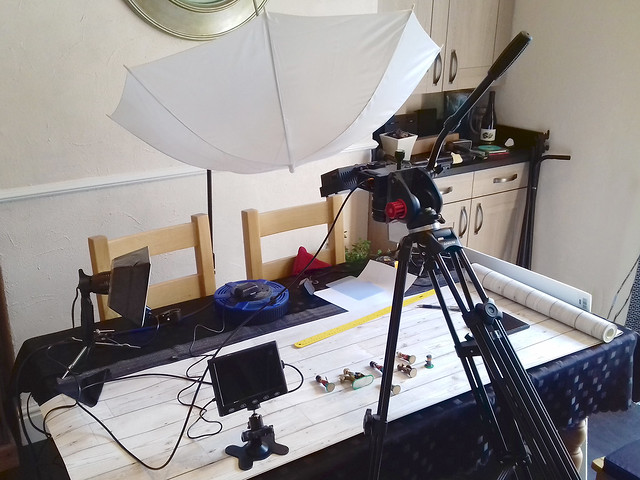
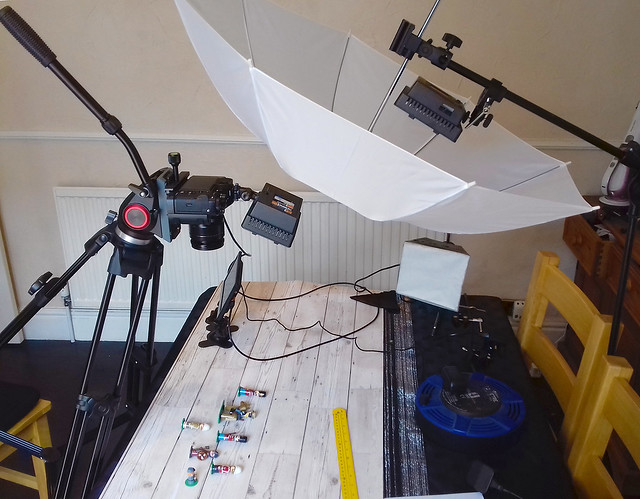
To do this I will lash up a make-shift camera rig using my tripod and other bits and bobs - just so I can work with the various bits of equipment and work out the ideal arrangements for the final frame layout. For this test I requisitioned the wife's dinning room table (temporarily - I was told)...


Excuse the shoddy snap, hopefully you can make out what's going on here. I've just tipped up my video tripod so that I get a top-down perspective with my camera and set up various types of lighting to try out.

One lesson learned straight away even at this early stage was the benefits of having some form of field or preview monitor so you can keep an eye on camera settings, focusing and framing.


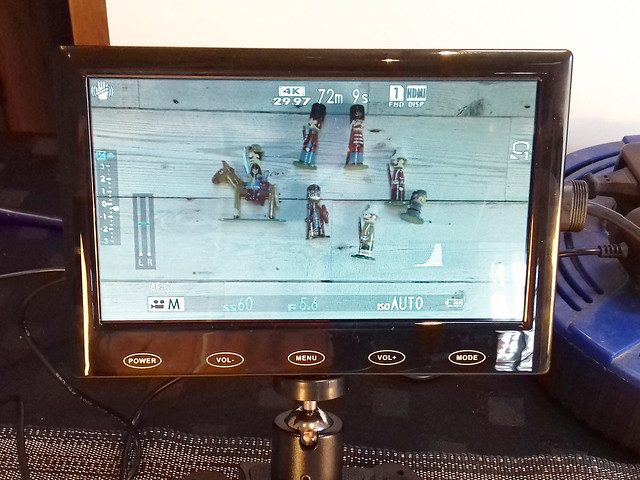
Even if my Fuji XT-2 had a flip and swivel screen it wouldn't be entirely suitable for monitoring tabletop tutorial filming and so a separate preview monitor is recommended. A proper video feed monitor - with all it's bells and whistles - is probably overkill in this situation (although good to have if you can afford one) so I bought a very cheap (£30) 7 inch LCD HDMI monitor for the job.

The addition of a preview monitor means I can sit down - as I would be in a filmed tutorial situation - and work with my tabletop objects with the monitor still in my line of sight, but just out of frame.

This little screen still shows me my cameras main settings - including histogram - and is just sharp enough so I can check focusing. The downside is that colour rendition isn't accurate and it doesn't have the focusing and hand other assist features that a real field monitor would. But, for £30 I'm not complaining.


Conclusions
Despite the messy lashed together set-up, I had a very productive session and made lots of notes. My dinning room 'video lab' also had the added benefit of being right next to our kitchen so I was able to replenish my mug of tea without going to far!

1. Camera Height: The first issue I got to grips with was the camera height. I decided to stick with my Fujinon 18-55mm zoom to give me some flexibility in framing shots and testing relative proximities between subject and lens.

In the end I settled on my camera being about 1.5 feet (44cm) from the table - to lens - and my zoom set around 20mm.

2. Focus Setting: Because I will be shooting tabletop tutorials and, so, move from wide shots to closeups quickly I decided to set my camera to continuous auto-focus with the point of focus centre biased using the zone AF mode. Yes, there will be a little focus searching when I move from table distance to 'close-up' (about 7 inches from the lens), but this is the least 'fussy' way of doing things to begin with.

3. Lighting: You can never have enough light, and although I think my test proves this point it also proved that it's a particular sort of light that I am short of.

Because my models are glossed - with varnish - strong harsh lighting is not helpful as it produces very aggressive reflections. I, therefore, need defused lighting so as not to create too many bright highlights on my subjects and by doing so lose detail.

My current problem is that I only have one LED lamp which can generate enough illumination when defused - my Neewer 304 LED lamp (and I had that turned up to max) - so I will have to buy another so I have the level of control that I am after.

I used a umbrella to create the soft light I wanted, but this is also a problem as this is far too large and cumbersome to be suitable for my overhead table frame concept. I may, therefore, have to make some sort of compact soft box and try that out (more experiments)!

4. Camera settings: Funnily enough, my shooting settings were perhaps the least of my problems as the XT-2 is such a great camera that it didn't take long to settle on some working settings (although that isn't to say they won't be modified as I gain more experience).

The one thing that did have me scratching my head was what video recording mode to shoot in; FHD (1080) or UHD (4K)? And, also, what flavour of either of these resolutions - 24fps, 30fps or 60fps.

Although I am aiming at 1080HD output for YouTube, I did - initially - fancy FHD 60fps for reasons of detail, but then decided upon 4K and downscaling to FHD so I have the flexibility to crop, zoom and animate within my editing software.

Result...


A wee bit soft and a touch dim causing the loss of some of the details
in the shadow areas...More light needed!

-------------

Anyway, this was all very sloppy and a lot of 'guesstimation', but it got me a starting point. I can refine my technique with practice. Most importantly, I have the data I need to start making my overhead camera frame.

Sunday, 5 August 2018

Arca-Swiss QR Mount

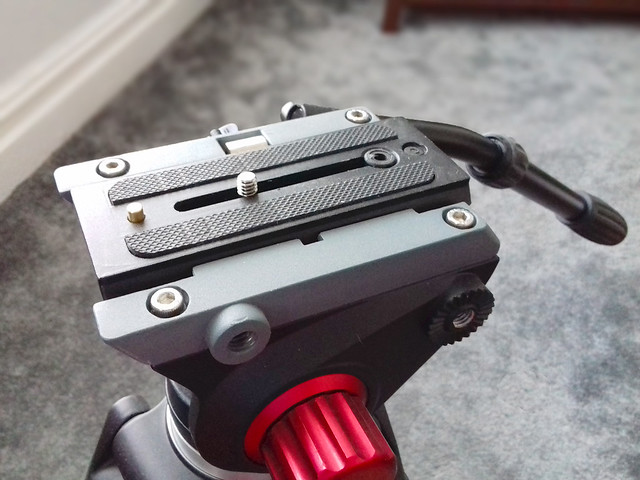
Do I *need* an Area-Swiss camera mount? Debatable, but attaching my DSLR camera to the video plate that comes with my Andoer video tripod has always niggled me. You see, the camera mount and  plate on my *video* tripod is designed for use - primarily - for a camcorder (naturally) and while it does accommodate a DSLR camera 'OK', I don't like the huge plate hanging off my camera...


Camcorders, being *long* - while DSLRs are *wide* - means that the mount plate on my tripod overhangs a very long way when I attach my Fuji XT-2. Again, this isn't a major thing and the plate attaches very securely, this is just one of those things that is - randomly - irritating to me! :)

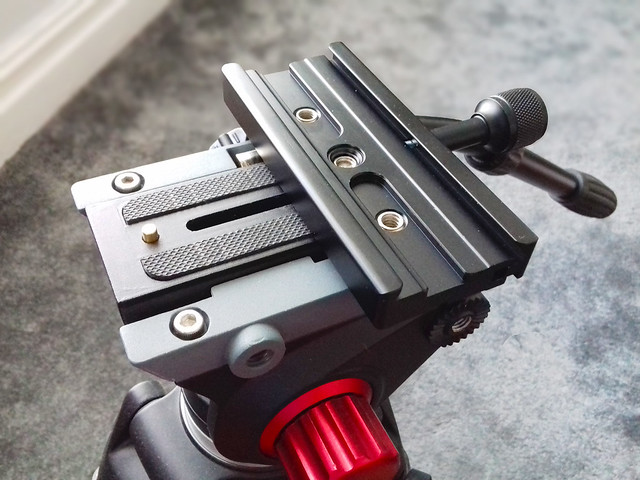
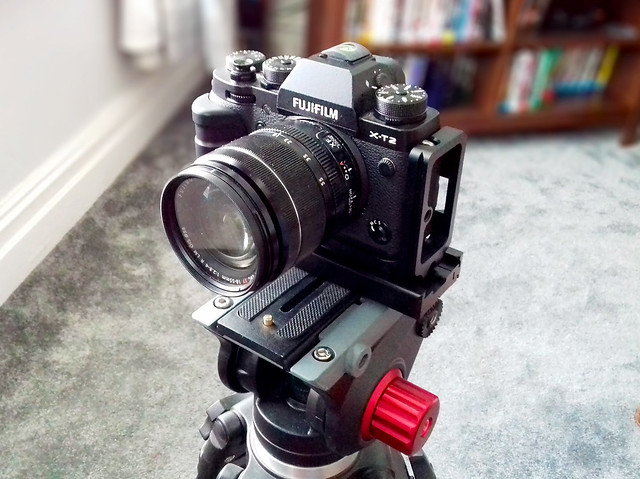
The Arca-Swiss QR mount is design for photo-cameras and mounts using a rail that runs the width of the bottom of the camera or camera cage (I have a cage). This then attaches to my video mounting plate converting the long video mount to a wide photo-camera mount...

Fotga QR-120 Clamp Adapter For Quick Release Arca-Swiss plate.


So what? Well, the Area-Swiss system now being integral to my camera - thanks to the rail at the bottom of my camera cage - I no longer have to have a mount plate screwed to the bottom of my camera. I simply slide my camera into the Area-Swiss 'clamp' which is attached to my tripod mount.

3rd party 'L' grip for Fuji XT-2 camera with integral Area-Swiss rail.

This means I can very quickly whip my camera in and out and never have to worry if I left the tripod mounting plate on the desk at home or in the pocket of my other jacket. I also no longer have a very long video tripod mounting plate sticking out from under my camera.

As I say, these are small - not make of break - issues. But I feel better I have this sorted now. :)


I bought the camera's 'L' grip a while back to give my big hands a little extra purchase on the XT-2, the integral Arca-Swiss rail on the bottom was just an added bonus.

Thursday, 2 August 2018

Tabletop Filming Redux - Part 1

After a long hiatus - where I had to do some serious rethinking about the whole idea of my filming activities due to changes in work and life changes - I've concluded that my videography interests will have to be relegated to a 'hobby' rather than my original intention of exploring a small business.

But let's not bemoan lost opportunities and move on...

While I had originally had some ambitious ideas for film projects, I've had to scale these down to suit my new work schedule. But one thing that struck me is that I was missing a trick, somewhat, in that I had overlooked a interesting video opportunity on my 'own doorstep'.

Tabletop Filming
I am a pretty active craftsperson and modeller and I already blog a lot about these activities. However, I had often thought that text description and even still photographs do not adequately illustrate some of the techniques and processes that I use to produce some of my creative projects - filming the work would be far more effective.

Funnily enough, I had already started to explore the idea of filming my small hobby work table on this blog in a post I simply entitled 'Videoing Tabletop Tutorials' back in March 2017. But, this was a very simple attempt to capture my workspace using my GoPro Hero 4 camera and actually created more questions than it answered about focusing, lighting, camera angles and the ability to do close-up shots.


My conclusion at the time was that the GoPro was perhaps not the best camera for this purpose - being fixed focus with a minimum focus distance of about 30cm. I think I was going to try either my mobile phone camera or my Logitch webcam next, as they both have very responsive auto-focus systems which would be great for close-ups (but I didn't get round to it).

A More (Semi) Professional Approach
Obviously, the above experiment was very rudimentary to get me on my way towards finding a suitable solution to filming tabletop hobby activities. But, now I want to look more seriously into devising an effective means of recording craft and modelling work.

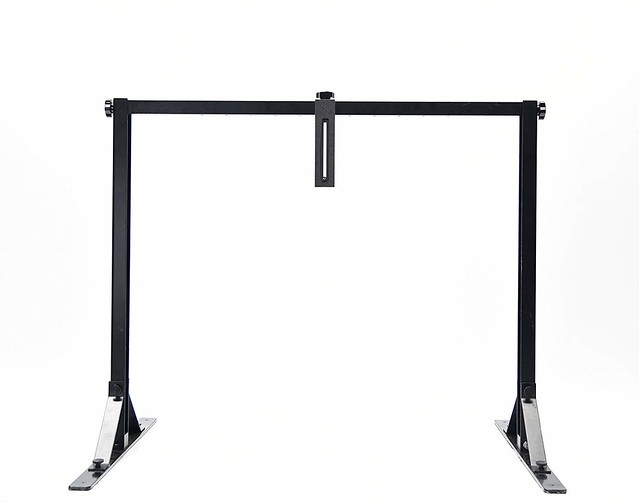
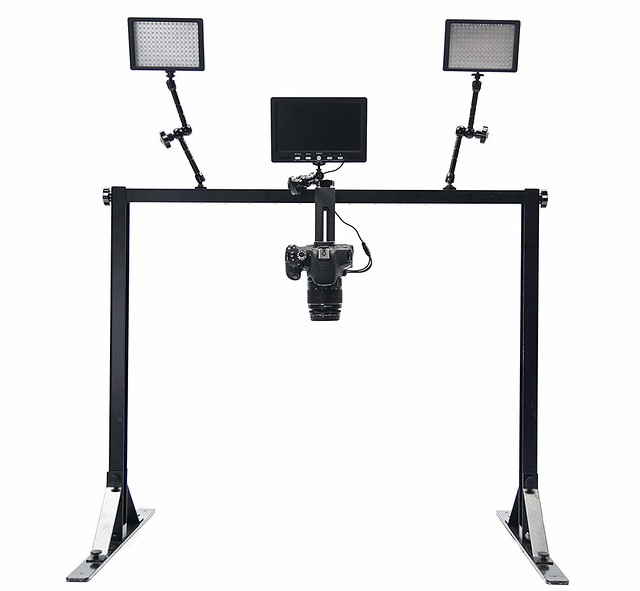
I did some research online and discovered that there is, actually, a purpose-built camera rig specifically designed for tabletop film-making - it's called an Overhead Camera Platform...

This upside-down 'U' shaped from sits on a tabletop and is
adjustable for height...
Camera equipment can then be clamped to the frame to allow
for 'top-down' filming of tabletop subjects.

Now, there are alternative solutions used by videographers - including cranes and also using a downward facing mirror - to capture tabletop scenes, but all of these require space (preferably a small studio) or money...And I have neither.

So, what I need is a more 'professional' approach but which comes with a budget price-tag and that will fit the constraints of my cramped workspace. Something that will sit on my workbench.

I've looked around for some DIY overhead rigs on YouTube and found a couple of options, here's a pretty good bargain basement rig idea...


Or, here's an alternative method for making a DIY overhead rig with some in-depth tips about how to set up your camera and the lighting...


SO... I now have a plan, a cunning plan, the first part of which is to design and make my own home-brew overhead video platform and then to shoot some tests. As it happens, my wife found something in our attic that might make a good cheapo rig...


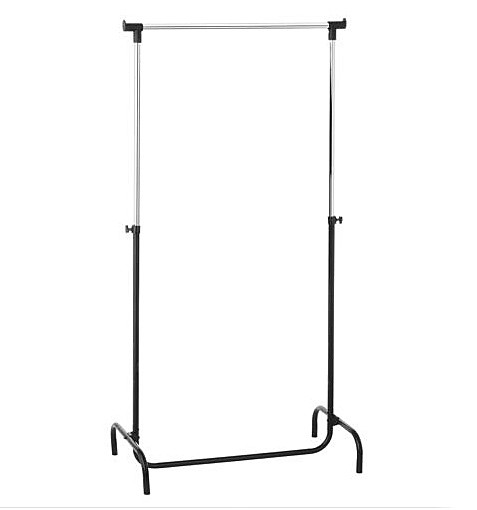
It's one of those clothes hanger rails, we've had one disassembled in storage for ages (in fact it was a bit rusty) and we were about to take it to the recycle dump...But I have an idea I could make a tabletop rig from it.

In part 2 of this post I get to work modifying my clothes rail with the help of my trusty Dremel tool!

Sunday, 29 October 2017

One Step Forward...

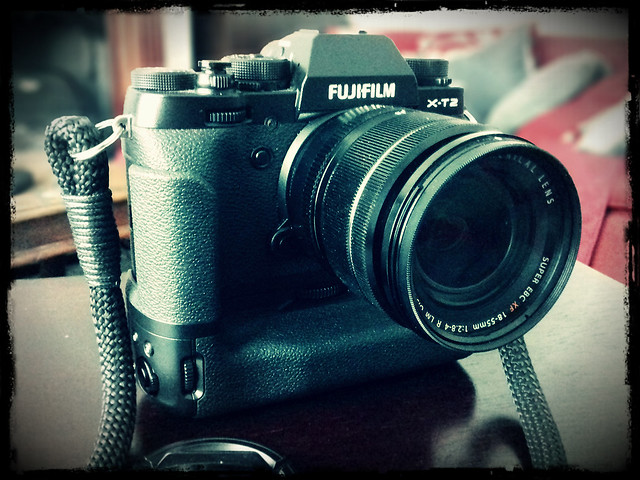
I finally managed to save the cash needed to buy the additional propriatory batteries required to run the Fuji X-T2's PoweGrip...


This really opens up my moviemaking and offers me new challenges. Although I could film in 4K before the limitations of just having one battery meant some very short outings (which very soon became a bit of a pain). The prospect of some longer experiments and learning sessions is quite exciting.

Ironically, while it's taken me quite a while to save up for these two extra Fuji batteries I had no sooner congratulated myself than I heard that Duracell has produced what are rumoured to be good quality alternatives to the Fuji NP-W126S shielded batteries at just £20 a piece!

Ah, well...I wouldn't be happy buying these alternatives until I read first-hand reports about their performance anyway. Still...Typical!

Monday, 3 July 2017

Shooting practise...Freehand.

I'm trying to build up a momentum and get as much practice with my X-T2 as I can. I don't have a firm plan for a set project yet, but I need as much camera time as I can get and I need footage to practise editing so - at the moment - I just need to get out there and shoot anything.

Aside from gaining familiarity with the camera I also want to practise some freehand shooting, filming without setting up a static tripod rig. Most of the filming I have done in the past has been of the fairly static interview format, so I haven't had a lot of experience filming hand-held.

I thought I would prepare for my next outing with some video tips...


And if all else fails, there is software stabilisation.

So, I trotted down to the harbour and snapped some handheld sequences. I tried my best to keep the clips as steady as I could - following some of the tips from the above video tutorial - but I obviously need more practice and ended up applying stabilisation in PowerDirector...


It was a bit of a dull, grey day so I probably over-compensated in my colour adjustments. But I'm still enjoying the novelty of playing with PowerDirectors settings.

I'm not entirely happy with software stabilisation, occasionally it can be a bit glitchy and jerky when you add it to a sequence that includes a pan or tracking movement. So the moral of the story is, try and take as steady footage as you can so you don't have to add stabilisation.

One other thing I noticed was how the wind affected my audio track. I hadn't thought it was that windy, so left off my Rode mic and it's windshield, trusting to the X-T2's integral microphone. The wind buffeting was noticeable when I got my footage into the editing software, so I had to remove the soundtrack.

From now on, if I'm doing any outside work, I'll fit the Rode mic and windshield by default.

Wednesday, 28 June 2017

Choosing a Fuji Film Simulation

I started to write this journal entry, but it turned into a long rambling discussion about F-LOG versus Film Simulations. (Spoiler alert...It's a case of horses for courses! But I will cover this in more depth later down the line.)

The position I find myself in at the moment is that I do not have an external 4K recorder (and cannot afford one), so I am limited to just recording vanilla unadulterated video or video treated with one of Fuji's integral Film Simulation modes (which can both be recorded onto an internal memory card).

As I said, it's a matter of personal preference as to which route you take, but in my case, the inclusion of Fuji's Film Simulation 'styles' was a principal reason I bought the X-T2. But, for those who are not familiar with Fuji's Film Simulations, they are 'what they say on the tin', they are digital simulations of analog film stock to give your digital photos or videos an analog 'look'...


See also, B&H's 'An Introduction to Fujifilm’s Film Simulation Modes'.

Although the above clip is principally aimed at stills photographers, these stylistic simulations are just as applicable to video recording. In fact, they take a lot off the shoulders of the videographer who likes to spend more time playing with his camera than they do in post fiddling about with colour grading (which is a bit dark art).

Certainly, this is why  I was attracted to the X-T2, I loved the look of some of the simulation modes and didn't (yet) want to caught up in the quagmire of tinkering for hours with software sliders.


Above: Some examples of the Fuji Film Simulations as used to film video. Here the
simulations are further tweaked in conjunction with the X-T2's internal settings to
make the end results even more unique.

So, Which Colour Simulation?
OK, having laid out my reasons for wanting to use Fuji's Film Simulations (with the caveat that once I'm a bit better off and a bit more experienced I would like to try out F-LOG via an external recorder and then applying LUTs in post) which simulation do I think is best? Well, once again, this isn't quite straight forward as Fuji never intended a photographer to just use one of its film types, you use which film type is most suited to your subject matter. And this is how it is with their film simulations too.

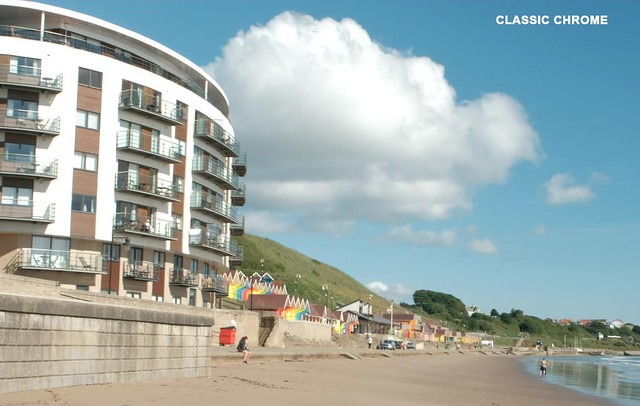
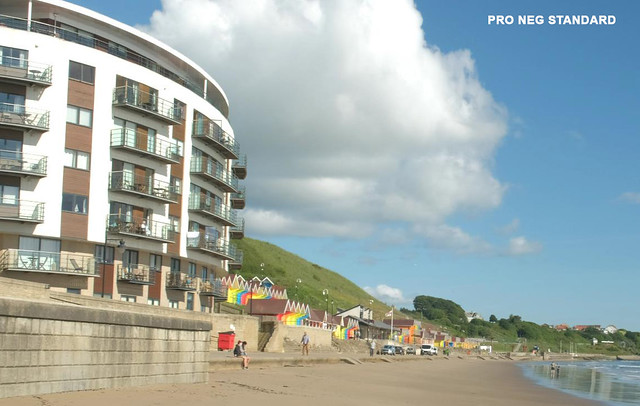
So, I tried out some experiments with the various types to see which suited my personal visual preferences - using some tips from other X-T2 videographers - and narrowed my initial favourite modes down to Classic Chrome, Pro Ned Standard and - as a wild card - Astia (which is a bit more saturated and pops the colours more).

Here are some screen grabs from the sequences I took in the three film simulation modes...


The differences are quite subtle but they are enough to have emotional relevance, creatively speaking. For example, I am drawn to Classic Chrome - it is slightly nostalgic in its colour reproduction reminiscent of Kodak's legendary Kodachrome (ironic that Fuji should reintroduce this film look).

For me, Kodachrome is indicative of my father's photos from my childhood holidays - which is probably why I am drawn to it, and I don't think I am the only one as the 60s and 70s 'look' of the film reproduction is a popular visual trope among the Hipster generation. Its retro slightly faded character exudes a comforting nostalgia...


As expected, Pro Neg Standard came in as a close second, which isn't very surprising as I did my homework first before I narrowed my interest down to the three film simulations that I tested.

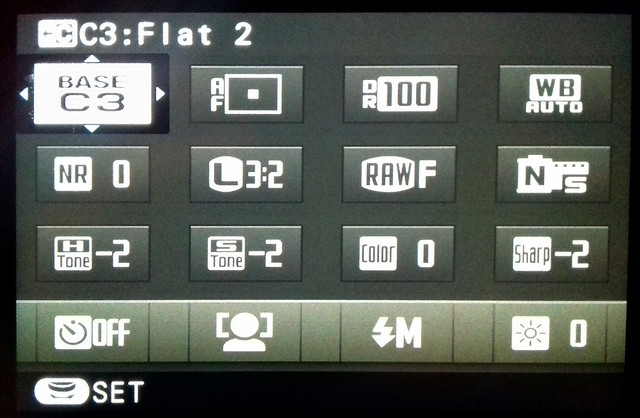
The advantage that Pro Neg Std. has over Classic Chrome is that it appears to have just a little more dynamic range (there a little more information in the shadows and the highlights). This makes this simulation the closest - with a little tweaking of the camera settings - to a flat output suitable for further colour grading in an editor.

The 'Q' (Quick) menu custom function set I have for my 'Flat 2' profile. This
custom setup gives my Pro Neg Std (N-S) a little flatter look by toning down
the Highlights (-2), Shadows (-2) and Sharpness (-2).
Finally, Astia is a bit of fun. It's a bit too saturated for my tastes and as you can see from the above screen grab it's output is somewhat reminiscent of holiday postcards. I find it a little insincere and superficially 'pretty' (so we can knock that one off the list).

Conclusion
Well, as much as I favour Classic Chrome, I won't be using it for everything. But it may well be my default go-to mode. It's a rather nice feature of the Fuji system that I have several film 'looks' I really like baked into the camera by default, rather than me having to make these simulations up myself via long sessions of colour grading or by trawling the internet for an elusive LUT that does a similar job.


Above: Here's a very short example of how the Fuji Pro Neg Standard Film Simulation
footage I shot can be further modified using colour presets in PowerDirector 15. It's
sort of a poor man's instant color grading, but the end results are pleasing enough.

More time to film, less mucking about in post! (Though, in time, it will be interesting to see if the novelty of film simulations wears off and I whether I begin to find this system constricting. We shall see.)