Showing posts with label exterior. Show all posts

Thursday, 4 July 2019

GoPro (Re)Training, Part 1

Filming with the Default Factory Settings
Well I'm back - after a huge hiatus (life stuff) - so in a way I'm starting from square one again as I've forgotten so much. Today I'm dusting off my GoPro Hero 4 Black - yes, I know, that is so 'old' now!
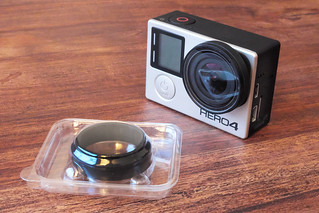
GoPro 4 lens cover by GoPro
In 2016 this was cutting edge...
Things move so fast in the work of action cameras, GoPro has advanced to the HERO 7 and you can now even get a 'cheap' GoPro clone as good as my Hero 4 (actually better, really, as you can get in-built stabilisation) for just over £100...And if stabilisation doesn't worry you then you can get a comparable action cam for just £60.

EKEN H9R Ultra HD 4K Action Camera
In 2019 this EKEN H9R Ultra does everything my GoPro 4 Hero Black
does, but for the price of just £54! Technology marches on.
But, let's begin with my Hero 4 as it's still a nice wee camera. Today I'm doing some sunny day filming with the camera's default factory settings so I can create some 'control' footage. I'll be using this to compare with subsequent footage using any modified settings.

A Walk in the Park?
We took the dog out to one of the little wildlife reserve parks on the outskirts of our town, a good opportunity for me to capture my base-line footage. It was a particularly sunny day so I was already prepared for some overexposure when filming into the sun and some unpredictable levels of exposure as I went abruptly from bright sunshine to dark shade as we passed though shaded wooded areas.

Aside from this, I didn't really know what to expect, so lets see some of the raw footage...


Lessons Learned...
While it's annoying having to learn all this stuff all over again, I was glad that the few problems I came across were minor 'niggles' and easily fixable. Here's a little list of things that I think need to be 'fixed' in my next test GoPro movie:


  • Stability: (Not strictly a GoPro problem, but...) The FeiyuTech G4 gimbal I used needs recalibration in order to get the horizontal axis level. There's about -3.5 degrees tilt on the left, though this can be corrected in post I suppose.
  • Audio: There is very obvious wind noise (rumble) throughout this test, I didn't think it was that windy on the day but this just goes to show how sensitive the GoPro's built in mic is. The solution would either be to cobble together a windshield mod to fix over the GoPro's mic OR I could use a better quality external microphone which has a proper windshield ('dead cat').
  • Colour Rendition: The GoPro's default colour and exposure settings are acceptable, but the advanced user may wish to experiment with the cameras custom settings, called 'ProTune Controls'. In future, I will be utilising these controls in order to produce 'flat' colour profile footage which I can then colour correct in post.

There are many tutorials on YouTube which suggest alternative settings which can get the best out of the GoPro, so I will try some of these out in my next test.

A 'Quick Fix'...
As a bit of a learning exercise I thought I would do some  minor post-editing to 'fix' at least a couple of the above issues using Power Director 17 (my editing software of choice) before attempting a 'hard' fix with another GoPro test.

First of all, I dealt with the offset horizon issue by rotating my clips -4 degrees to the left. Having rotated the footage, I then had to resize the clips to fill the frames. Luckily - because I shot in 2.7K (2704x1520) - I had some latitude to resize my footage without significantly affecting the final quality of my output, particularly as I eventually downsized my final output to 1080p.

Next, I experimented with colour correction in the software. After tinkering with some manual corrections, I eventually tried out Power Director 17's newly added ability to apply LUTs (colour 'Look Up Table' data files). I downloaded some free LUT profiles (.cube file format) which I imported into Power Director and tried a few different ones before settling on one called 'FG_CineCold'. This profile toned down the hot greens of my raw GoPro footage and gave the final movie an overall more subdued 'cinematic' feel (it's all a matter of personal preference, but I liked the effect).

Here's my 'corrected' movie clip...


Next: I'll try reconfiguring my GoPro with some advanced settings to see whether I can improve the quality of my raw footage.

Tuesday, 12 April 2016

Ricoh Theta S 360 degree video test

My latest toy. And I use my language carefully as this basic 360 video camera is little more than a 'technology tester' in my opinion. I fully expect that within a year there will be cameras of far better quality and resolution on the market (for the same or money as the £300 price tag of the Ricoh).

I was lucky, I persuaded my work that they should buy this camera to try out elementary 360-degree photography and video to gauge whether there was interest in the format. Specifically, we are interested in virtual guided tours of our facilities which would be hosted on our website.

The Theta S couldn't be more simpler. It a very basic compact (fixed focus) digital camera system with a lens at the front and a lens at the back. These two lenses record footage in sync to produce a 360 effect...Though, it's not quite as simple as that, as you will see.

But before we get into the nitty-gritty, here's a preview of the very first go I had with the Theta S. But I warn you - turn the volume down as it was a very windy trip and so the audio is terribly distorted.


Results - the not so bad, bad, and downright horrible!
Well, as you can see, it looks like an SD quality video from about 5 years ago! The reason for this is - although the marketing advertises that the camera can shoot in 1080p HD, that resolution is spread across the whole 360 degree of vision supplied by the two lenses. So, in effect, you don't really achieve 1080p quality at all - it's more like 1080HD stretched which results in a 640SD quality look!

A bit of a cheat - from a marketing point of view- and it has led to the greatest number of complaints by users, who are - understandably - a little disappointed with the quality that they are getting.

Add to this the awful software and upload system that Ricoh has cobbled together and it means that getting the best out of your Theta S is something of a grueling challenge! I have experimented with several ways to get the best out of the camera and it's MPEG4 footage, and my conclusion is that you cannot afford to drop quality in edit/conversion one iota as the quality of the original footage is only just adequate in the first place.

Here's a useful introduction which explains the Theta S workflow by Tony Cece...


(I'm looking into buying Apple's 'Compressor' app for FCPX so I can edit then output lossless MP4 files. We shall see.)

Anyway, all technicalities and gripes aside the camera is what it is - it's the first (as far as I am aware) consumer entry level 60-degree video (and stills) camera on the market. Things will undoubtedly improve, but the Theta S gives you a very useful first experience of shooting and deploying 360-degree video. And I've no doubt that this will be a more mainstream activity as the technology (and software) improves.

Stay tuned.

Monday, 21 March 2016

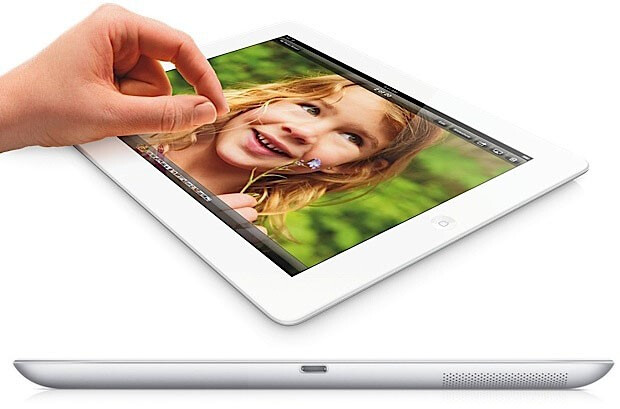
iPad (Gen 4) Movie Making tests - Part 1


Never having owned an iPad the idea of creating movies on a tablet was something of an anathema to me. They seemed too clumsy a device to be easy to use for capturing video and I had concerns about the size of the camera lens.

"...the iPad 4 (4th generation) supports “H.264 video up to 1080p, 30 frames per second..." Ipadwiki.com

Still, my casual experiences with shooting movies using my iPhone (5s) has taught me not to make assumptions. I have been pleasantly surprised with some of the shots I have managed to get with my smartphone and so I tried to have an open mind about the iPad.

First tests - exterior, subdued daylight
I knew I would have to do mt tests in two or maybe even three parts in order to appraise the iPad's abilities. Filming would have to include a variety of lighting situations, distances and static and moving subjects. So, for my first test, I did some filming at my local part, in the early morning, which would provide me with some subdued daylight with some patches of shaded areas...


In this test movement was kept to a minimum with no fast or abrupt camera movements. I also did not make use of the iPad's digital zoom. I quickly decided that this facility was not a viable option as the depreciation in picture quality is not

I did make some limited use of my new Koolertron 24"/60cm Ball Bearing Pro DSLR Camera Slider Dolly Track, but I kept the movement very slow.

Conclusion
Well, I was pleasantly surprised with my first attempts using the Gen 4 iPad. Obviously, as long as one is aware of the limitations of the technology then one can deliberately avoid highlighting it's limitations. And, in this case, the subject matter and lighting (and lack of movement) played to the devices 'strengths'.

I can see how, from my point of view, the output from the iPad might represent  a current 'minimum spec' for movie-making. But, still, it is watchable - within the limitations of how one might expect to deploy this sort of movie for general viewing (500 pixels wide within a web browser). I've yet to view this movie on a large TV screen, but I can imagine how the crispness one get's in this 'squeezed' 500px format will dissipate, soften and ultimately start to pixelate quite noticeable.

It (the iPad) is, after all, what it is.

One thing I should add, I was really impressed with how easy the iPad was to handle in hand-held situations. The size and shape were ideal for a two-handed grip, which made filming by hand quite steady and intuitive.

It was also very nice, as a camera user who has had to put up with little 4 inch LED screens on my other cameras, to have a luxuriously large preview screen! I can now see why so many DSLR and video camera users like to use large 'field monitors' - the extra screen really helps you to frame, check focus, identify small objects that you would have missed on small screens and give you a sharper window on your 'world'.

Useful link: iPad Generation 4 technical spec at Wikipedia

Next: I'll try the iPad out indoors in an interview situation, with particular attention to the quality of sound recording.